In stock

Norwii N97s TV Screen Presentation Clicker for PowerPoint Presentations, PowerPoint Clicker, Presentation Rremote, Bluetooth Wireless Presenter, Digital Pointer for TV Screen

£39.99

BUY NOW
Category: Presentation Remotes

  • Introducing the Norwii N97s TV Screen Presentation Clicker – the ultimate tool for seamless presentations! This innovative digital pointer is designed to work effortlessly on both TV screens and projection surfaces, making it an ideal companion for any presenter. Whether you're showcasing a PowerPoint presentation, Google Slides, or even Prezi, the Norwii N97s has got you covered.
  • With compatibility for Windows 7 and macOS 10.15 or later, this presentation clicker supports all leading software, including Propresenter and Zoom. Enjoy mouse-like control with just a simple left click, allowing you to play or pause videos and open links without the hassle of right or double clicks.
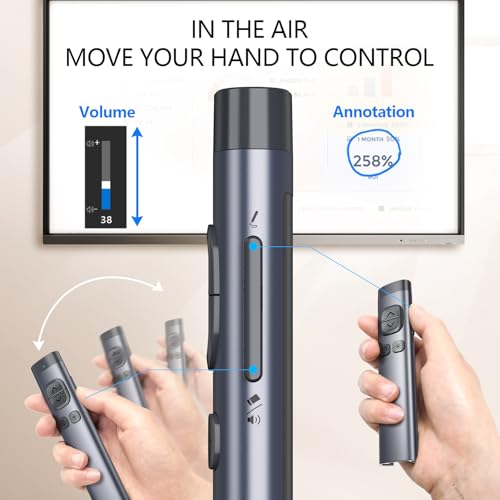
  • One standout feature is the pixel-precise highlighting and enlarging capability, which can elevate your presentation by drawing attention to key points. Connect effortlessly via energy-efficient Bluetooth or the 2.4G USB-A & C receiver, switching seamlessly between the two. Plus, with instant access to PowerPoint’s built-in virtual pointer, no installation is required—just plug in and present!
  • Crafted with a robust metal case and featuring ultra-quiet buttons, the Norwii N97s guarantees a comfortable and professional user experience. Perfect for educators, corporate trainers, or anyone looking to impress an audience, this presentation remote is your key to captivating presentations. Don’t miss out on transforming your delivery—get the Norwii N97s today!

Read More

Frequently Asked Questions

Popular questions and answers about this product

What devices is the Norwii N97s compatible with?

The Norwii N97s is compatible with Windows 7, macOS 10.15 or later, and supports all major presentation software like PowerPoint, Prezi, and Google Slides.

How do I connect the Norwii N97s to my computer?

You can connect the Norwii N97s via energy-efficient Bluetooth or using the included 2.4G USB-A & C receiver, allowing for seamless switching between both options.

Can I use the Norwii N97s for video playback?

Yes! The Norwii N97s allows you to play and pause videos simply by using the left mouse button, making it perfect for multimedia presentations.

Is there any software installation required?

For basic use, no installation is required as it offers instant access to PowerPoint’s built-in virtual pointer in full-screen mode on Windows.

What makes the Norwii N97s stand out from other presentation clickers?

The pixel-precise highlighting and enlarging features, coupled with a robust metal case and quiet buttons, provide an unparalleled user experience compared to competitors.

Who would benefit from using the Norwii N97s?

This presentation clicker is perfect for educators, corporate trainers, and anyone needing to deliver engaging presentations to an audience.