Are you looking to enhance your presentation skills and captivate your audience? The Kinizuxi Presentation Clicker is the perfect tool to help you achieve just that. With its user-friendly design and impressive features, it’s a must-have for anyone who regularly presents. The clicker's wireless capabilities allow you to move freely around the room, engaging with your audience while maintaining full control over your slides.








In stock
Presentation Clicker for PowerPoint Remote, Hyperlink Volume Wireless Presenter Remote Presentation Pointer, USB Presentation Remote Slide Advancer PPT Clicker for Computer Laptop Mac
£9.89
- Introducing the Kinizuxi Presentation Clicker – your ultimate partner for seamless presentations! Designed with the modern presenter in mind, this wireless PowerPoint remote boasts a range of impressive features tailored to enhance your delivery. Whether you’re leading a meeting, delivering a lecture, or hosting a workshop, our clicker simplifies your presentation experience with its plug-and-play functionality. Forget about complicated setups; with no software installation required, you can focus on captivating your audience instead of tech troubles.
Frequently Asked Questions
Popular questions and answers about this product
1. How do I set up the Kinizuxi Presentation Clicker?
Setting up your Kinizuxi Presentation Clicker is a breeze! Simply plug the USB receiver into your computer, and you're ready to go – no software installation is required!
2. What is the range of the Kinizuxi Presentation Clicker?
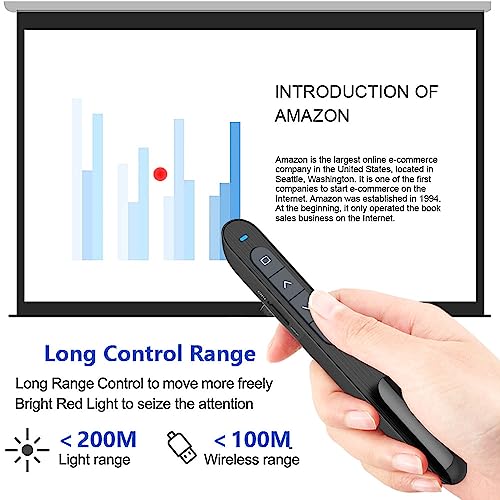
The clicker offers an impressive control range of up to 100 metres, while the red laser pointer can reach up to 200 metres, giving you the freedom to move around during your presentation.
3. Is the Kinizuxi Presentation Clicker compatible with Mac OS?
Absolutely! The Kinizuxi Presentation Clicker works seamlessly with Mac OS, as well as various Windows versions, Linux, and Android systems.
4. How do I use the laser pointer feature?
The laser pointer is activated with a simple button press, allowing you to highlight important points in your presentation effortlessly.
5. What type of battery does the clicker use?
The Kinizuxi Presentation Clicker requires one AAA battery (not included). The low power LED indicator will alert you when it’s time for a battery change.
6. Can I use this clicker with Google Slides?
Yes, the Kinizuxi Presentation Clicker is compatible with Google Slides, as well as various other presentation software like PowerPoint and Keynote.
Useful Posts