In stock

Presentation Clicker Wireless Presenter Remote: Red Light Pointer PowerPoint PPT Clickers, Rechargeable USB Presentations Finger Ring Hyperlink Google Slide for Mac Laptop Office Computer

£14.99£16.99

BUY NOW
Category: Presentation Pointers

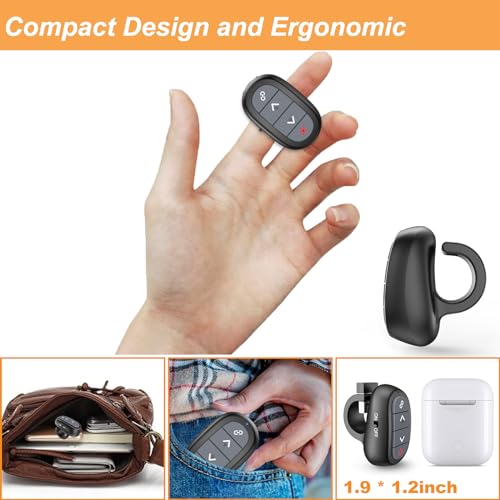
  • Discover the ultimate tool for effortless presentations with the OMYPOTT Presentation Clicker Wireless Presenter Remote. This innovative clicker is designed for professionals and students alike, combining a sleek, ergonomic design with practicality. The built-in environmentally friendly ABS plastic finger loop allows you to wear the clicker comfortably on your index finger, enabling you to keep your hands free while engaging your audience.
  • Setting up this wireless PowerPoint clicker is a breeze—simply plug the USB receiver into your device, and you’re ready to go! No need to fuss with software installations. It supports essential functions such as full screen, black screen, page up, page down, and features a bright red laser pointer with an impressive control range of 98FT (30M) and a laser range of 328FT (100M). This means you can roam freely around the room, maintaining eye contact and interaction with your audience.
  • What sets this presentation pointer apart is its rechargeable USB-C functionality. With just one hour of charging, enjoy up to a week of use. The clicker also features an on/off button and an auto-sleep function for exceptional battery efficiency. Compatible with various systems—Windows, Mac OS, Linux, and Android—this versatile clicker works seamlessly with popular software like PowerPoint, Google Slides, and more.
  • Whether you're delivering a business proposal, a classroom lecture, or an engaging workshop, the OMYPOTT Presentation Clicker is your perfect presentation partner. Elevate your presentations today!

Read More

Frequently Asked Questions

Popular questions and answers about this product

What devices is the OMYPOTT Presentation Clicker compatible with?

The OMYPOTT Presentation Clicker is compatible with Windows, Mac OS, Linux, and Android systems, making it versatile for various devices.

How long does it take to charge the clicker?

The clicker requires only one hour to fully charge, allowing for a week of regular use, thanks to its efficient battery management.

Can I use the clicker without installing any software?

Yes! The OMYPOTT Presentation Clicker is plug-and-play; simply insert the USB receiver into your device, and you're ready to present without any software installations.

What is the range of the remote control?

The wireless presenter has a control range of up to 98FT (30M) and a red laser pointer range of 328FT (100M), giving you the freedom to move around during your presentation.

Does it have an auto-sleep function?

Yes, the clicker features an auto-sleep function that helps to conserve battery life when not in use.

What types of presentations can I use this clicker for?

The OMYPOTT Presentation Clicker is perfect for a variety of presentations, including business proposals, classroom lectures, workshops, and conferences, compatible with software like PowerPoint and Google Slides.